Sunday, 28 April 2013

Evaluation Task 4
In this task i will be talking about all of the technology software i used to create the trailer, poster and magazine front cover. i used several pieces of software which are easy to access to use for an amateur production which is shown with my productions.
the software i used for m productions were: Adobe Photoshop (magazine front cover and poster) Adobe Premiere elements (trailer) garage band (soundtrack) Blogger , Google , Sketchbook pro , final cut pro and mindjet.
Trailer - The production of my trailer used many different type of software. First of all i had to do the storyboard which i wanted to have clarity and be able to understand the story for not just myself but everyone watching. To draw the storyboard the program used watch sketchbook pro which was used to draw individual slides which was used on a bamboo tablet this isn't as amateur and is connected to a computer and you use the mouse to draw on it which comes up on the computer. Both of the software's used were very helpful for the production of the storyboard and i was very please with the clarity, it was also good to get basic sketches and easy to learn to use. Another piece of software i could have used would have been Adobe Photoshop which is a good piece of technology to use and very easy to use, but wouldn't be a suitable for the storyboard as you only need basic clear sketches. For the filming of the trailer we used a video camera provided by my school, which was a fujifilm camera which is a very amateur camera but is good to use in all conditions as it has its perks. The quality of the camera was very amateur an does not give a high resolution as a professional camera would have. This is one way in which our trailer could have been improved on giving a clearer picture but it also had its benefits by giving more of a rugged look i feelt like it added to the amateur feel to our basic British horror. The camera was also easy to use and had a few buttons which made it good to use. The way in which we could import the filming straight to the computer was also very easy with a flip USB which could be use to pop out the side when needed but this part was also very fragile. We wouldn't be able to use an expensive camera having a small budget but i do feel this camera played to the strengths of our film being able to place the camera is more rugged conditions where as using a more expensive camera we would be able to do. The tripod we used also helped with the steadiness of our film having a handheld camera makes the filming extremely poor quality so using a tripod was very important otherwise the film would be barely watchable. We used the tripod in the woods whilst filming and on uneven ground.
 this is the bamboo tablet.
 This is the tripod i used to steady the camera during filming.
Finishing the animatic - For the final piecing together of the animatic i needed to use piece of software which i could use to put the sketches together from the storyboard. For the animatic i needed to make sure to keep the clarity like in the storyboard. The animatic is the start to piecing together of the trailer and is very important to have a clear structure. Animatics are important to gaining backing from big/small media companies so having a good animatic is important to aking a film happen. By saving the sketches as a JPEG from the detailed storyboard i could use Adobe Premiere Element to easily piece the animatic together, i have used Adobe Premiere Element before so having previous experience with the software i found it a lot easier to use. Another software i could have use would be windows movie maker which is a simpler version of Adobe Premiere Elements and is easier to use but having previous experience with Adobe Premiere Elements i felt confident using a more professional piece of software. By coping and pasting the JPEGs of the storyboard sketches i could just drag the pictures in order and change the time i waned each sketch to last for.

This is Adobe premiere elements which i used for the animatics.
 This is the animatic getting put together using Adobe premiere elements.
Soundtrack - For the production of our trailer we decided to create our own music which i have never done before. I ued garageband and a MIDI keyboard. This helped me create the soundtrack and i picked up on how to use this quickly. This software is easy to use and once playing around with it i found it very beneficial to create a decent soundtrack.
 This is Garage band in use.
Poster and magazine cover - The production of poster and magazine was done using the same software.
To begin i created the basic poster idea which i had in mind for a long time which was a spooky picture of the woods with Faded Delusion at the bottom with the awards we won and a tag line but after evaluating this i decided to change it around to have more of an effective amateur poster which would attract the audience from 16- 25 that liked old school horrors. For the creation of this i decided to use Adobe Photoshop as it is easy to use and i have previous experience in using this. The poster was then getting put together by using the tools in Adobe Photoshop. I chose a more effective image for the poster then got the right font and used magic wand to select the title of the film to place on the poster, then by find credits and using magic wnd again to select the awards we have won from amateur film festivals and place them in the bottom corners of the poster after completing the poster i was very happy with the feel it gives which is a low budget amateur poster that will attract the horror audience. It also gave the feel of a 1980's horror which is the feel i wanted to go for. The magazine was the same process an used the same software. I also had a idea for the magazine which w the fuzzy background from the film with Faded Delusion in the middles but we decided to put the villain on the front and in the middle which will attract the audience. To select the title of EMPIRE i used to used the magic wand tool again after using it for the poster i was more confident with using this tool. The magazine cover was easy to piece together.
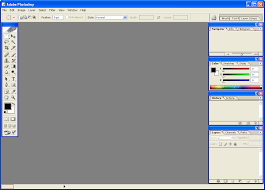 This is Adobe Photoshop.
the software i used for m productions were: Adobe Photoshop (magazine front cover and poster) Adobe Premiere elements (trailer) garage band (soundtrack) Blogger , Google , Sketchbook pro , final cut pro and mindjet.
Trailer - The production of my trailer used many different type of software. First of all i had to do the storyboard which i wanted to have clarity and be able to understand the story for not just myself but everyone watching. To draw the storyboard the program used watch sketchbook pro which was used to draw individual slides which was used on a bamboo tablet this isn't as amateur and is connected to a computer and you use the mouse to draw on it which comes up on the computer. Both of the software's used were very helpful for the production of the storyboard and i was very please with the clarity, it was also good to get basic sketches and easy to learn to use. Another piece of software i could have used would have been Adobe Photoshop which is a good piece of technology to use and very easy to use, but wouldn't be a suitable for the storyboard as you only need basic clear sketches. For the filming of the trailer we used a video camera provided by my school, which was a fujifilm camera which is a very amateur camera but is good to use in all conditions as it has its perks. The quality of the camera was very amateur an does not give a high resolution as a professional camera would have. This is one way in which our trailer could have been improved on giving a clearer picture but it also had its benefits by giving more of a rugged look i feelt like it added to the amateur feel to our basic British horror. The camera was also easy to use and had a few buttons which made it good to use. The way in which we could import the filming straight to the computer was also very easy with a flip USB which could be use to pop out the side when needed but this part was also very fragile. We wouldn't be able to use an expensive camera having a small budget but i do feel this camera played to the strengths of our film being able to place the camera is more rugged conditions where as using a more expensive camera we would be able to do. The tripod we used also helped with the steadiness of our film having a handheld camera makes the filming extremely poor quality so using a tripod was very important otherwise the film would be barely watchable. We used the tripod in the woods whilst filming and on uneven ground.
this is the bamboo tablet. This is the tripod i used to steady the camera during filming.Finishing the animatic - For the final piecing together of the animatic i needed to use piece of software which i could use to put the sketches together from the storyboard. For the animatic i needed to make sure to keep the clarity like in the storyboard. The animatic is the start to piecing together of the trailer and is very important to have a clear structure. Animatics are important to gaining backing from big/small media companies so having a good animatic is important to aking a film happen. By saving the sketches as a JPEG from the detailed storyboard i could use Adobe Premiere Element to easily piece the animatic together, i have used Adobe Premiere Element before so having previous experience with the software i found it a lot easier to use. Another software i could have use would be windows movie maker which is a simpler version of Adobe Premiere Elements and is easier to use but having previous experience with Adobe Premiere Elements i felt confident using a more professional piece of software. By coping and pasting the JPEGs of the storyboard sketches i could just drag the pictures in order and change the time i waned each sketch to last for.
This is Adobe premiere elements which i used for the animatics.
This is the animatic getting put together using Adobe premiere elements.Soundtrack - For the production of our trailer we decided to create our own music which i have never done before. I ued garageband and a MIDI keyboard. This helped me create the soundtrack and i picked up on how to use this quickly. This software is easy to use and once playing around with it i found it very beneficial to create a decent soundtrack.
This is Garage band in use.Poster and magazine cover - The production of poster and magazine was done using the same software.
To begin i created the basic poster idea which i had in mind for a long time which was a spooky picture of the woods with Faded Delusion at the bottom with the awards we won and a tag line but after evaluating this i decided to change it around to have more of an effective amateur poster which would attract the audience from 16- 25 that liked old school horrors. For the creation of this i decided to use Adobe Photoshop as it is easy to use and i have previous experience in using this. The poster was then getting put together by using the tools in Adobe Photoshop. I chose a more effective image for the poster then got the right font and used magic wand to select the title of the film to place on the poster, then by find credits and using magic wnd again to select the awards we have won from amateur film festivals and place them in the bottom corners of the poster after completing the poster i was very happy with the feel it gives which is a low budget amateur poster that will attract the horror audience. It also gave the feel of a 1980's horror which is the feel i wanted to go for. The magazine was the same process an used the same software. I also had a idea for the magazine which w the fuzzy background from the film with Faded Delusion in the middles but we decided to put the villain on the front and in the middle which will attract the audience. To select the title of EMPIRE i used to used the magic wand tool again after using it for the poster i was more confident with using this tool. The magazine cover was easy to piece together.
Monday, 22 April 2013
Faded Delusion Poster

Friday, 19 April 2013

Thursday, 18 April 2013
Evaluation Task 3
Monday, 15 April 2013
Evaluation activity 1

1.In the first screen grab i have chosen a scene where the reporter and being chased by the Slenderman who is in the background watching him run. in this screen shot it also introduces the actors with the titles. This is a long shot of both characters and leaves the audience with a big enigma to why he is running? How powerful is the Slenderman? The location this is shot in the woods which is a prime location for the Slenderman likes to strike. You can see the Slenderman in full costume and we used a long shot to show both characters and the way in which the Slenderman is watching a frightened reporter. we chose t do this long shot because it shows the extent of fear that the reporter is feelings and gives that feel to the audience.
2.In the second screen grab we see a black hand of the Slenderman reaching to shut the door on the reporter with the annotation below ' The reporter that got too involved' leaving even more enigmas for the audience. We use a POV shot ( point of view ) giving the audience the feel that they are the Slenderman watching the reporter. This also helps introduce the reporter and shows how interested the Slenderman is with him. We also used the titles in this shot to give more of a trailer feel to the audience and explain the story more.
3. For the 3rd screen grab i have chosen from the trailer when it fades to black from the little boy playing, his mum has just been interviewed by the reporter and says ' Watch out' there are more shots like this to give the horror feel in the trailer and the tense music that goes with it will get the audience thinking and make them tense as they will be thinking they have to watch out for Slenderman.
4. In this screen grab is show the reporter sitting down on his laptop writing up his story as with every reporter its hard to get that story that will make them a well known reporter. This introduces the character of who he is and what he is doing which shows in a later screen grab.
5. This screen grab shows the little boy who has just seen something , drops his toy and screams looking right at the audience who have the feel of how scared the boy is. It also tells the audience that the Slenderman is following the reporter as he finds out more and starts to leave trails that the reporter could be being set up by the Slenderman.
6. In this shot is shows the Slenderman being introduced with a medium shot slowly getting closer and reaching towards the audience suggesting he is saying ' you're next' as he reaches towards the audience it will make them scared and he gets closer quickly with editing. This also shows location of the woods which we also see in screen grab 1 and the reporter running. The Slenderman is wearing a suit but has no distinctive features just a blank face i feel this makes him very scary and fits in perfectly for the horror genre.
7. In this screen grab is shows the reporter sitting down watching the news, looking for a story to make himself big. sitting down in his dressing gown shows he his career isnt going as planned and maybe he can find an interesting story to make himself big. In this shot we used an over the shoulder shot which pans into the news we felt this was very effective giving the audience the feel that they are in the room.
8. This screen grab shows the title of our film using basic black and white which we feel is very effective and stands out a lot to the audience. We have chosen teh same font throughout the trailer which we feel fits in well with this horror trailer. Faded Delusion to the audience will make them know straightaway that it is a horror film and a dark film.
9. This is a screen grab of our production company which we made ourselves. It is a British low budget company which has won a few festivals which is shows also in the trailer. This also tells the audience that the company supports horror films with the name ' Graveyard Productions'. The animation was created by using Adobe flash. This is a god shot because is allows the audience to see that this is a low budget production. It adheres to the conventions of a horror trailer by having a gravestone and lightening and this production shows that our production aims towards just creating horror films.

Wednesday, 10 April 2013


Wednesday, 3 April 2013
Evaluation Targets
There is minimal evidence of evaluation. You need to include analysed screen grabs and a director's commentary and must address the strengths of your production compared to last year's production. What did you actually do in the editing process and how? Make sure you are using technical terminology and explore how all three production tasks compliment each other. Where is your magazine front cover and your film poster?
Subscribe to:
Comments (Atom)